Starting 1 January 2026, the MyKasih application will revise its login verification system, transitioning from SMS-based one-time-passwords (OTP) to OTPs sent via email.
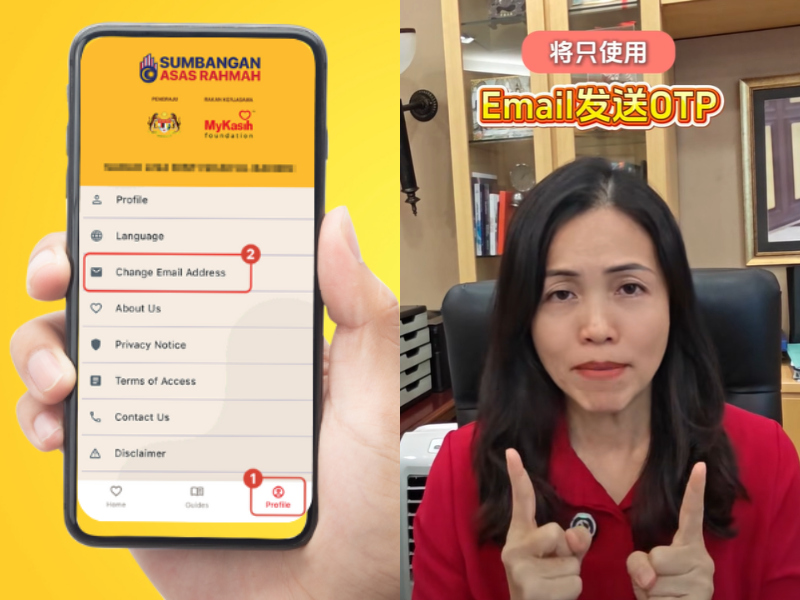
The updated login method is intended to streamline account access and enhance user security. Users are advised to download the MyKasih application only from official platforms such as Google Play Store and Apple App Store, and to avoid clicking on unfamiliar links that may pose security risks.
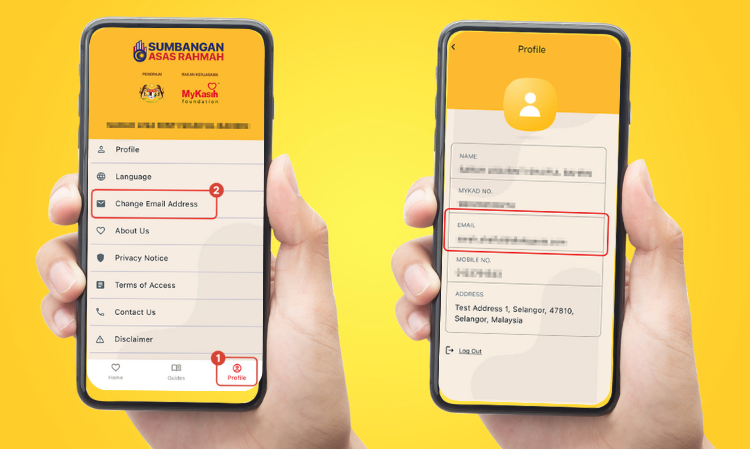
Image credit: MyKasih
How to register your email address for MyKasih
Users may follow the steps below to register an email address in the MyKasih application:
- Open the MyKasih application and select “SARA Bulanan & Penghargaan SARA RM100 one-off”
- Proceed to log in
- For first-time access, the OTP will be sent via SMS
- After logging in, tap “Profile” at the bottom right of the screen
- Select “Change Email Address”
- Enter a valid email address to receive future OTPs via email
Email registration is optional
According to Deputy Communications Minister Teo Nie Ching, email registration is not mandatory and is mainly provided for users who wish to view transaction history, check remaining balances, and locate nearby MyKasih-participating outlets.

Image credit: Teo Nie Ching (张念群) (Facebook)
Those who are less familiar with mobile applications may continue using their identity cards for purchases at participating stores, without any changes to the existing process. Users are also reminded to utilize their SARA assistance funds by 31 December.
“Any unused balance after the deadline will be returned to the Ministry of Finance and set aside as reserve funding for the 2026 SARA assistance programme,” she said.
For further assistance, support is available via the MyKasih hotline at 03-77201800 during office hours or through the official MyKasih website.
Follow Wah Piang for more.